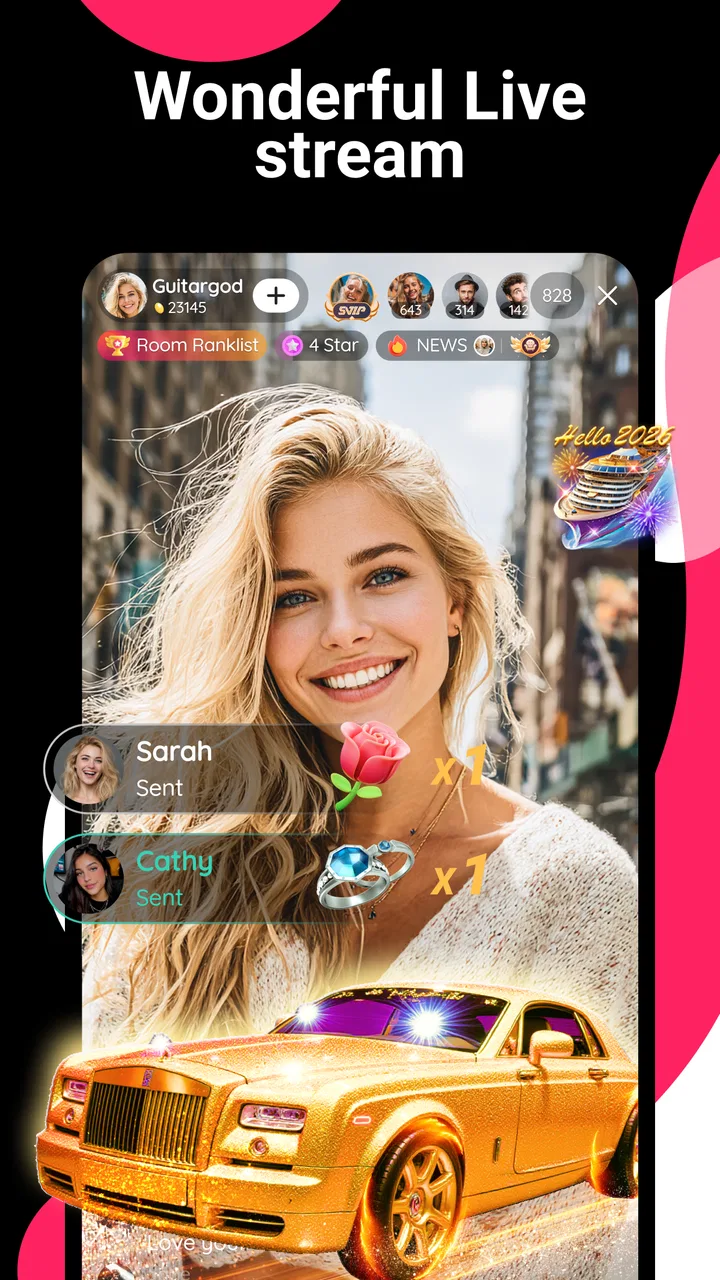
Likee-Live, Chat & Party Games
- 4.4
- Rating
- 1.00B
- Installs
- Free
- Price

 Analysis by App-foxy
I approached Likee as more than a place to watch quick clips. It is a social video app where the main experience depends on discovering, creating, and reacting to short-form content, so its usefulness changes a lot depending on how comfortably you handle fast visual movement, layered controls, sound, and constant recommendations. After spending time with it, I found an energetic platform with a low entry barrier, but also one that asks users to make several personal adjustments before it feels manageable.
That distinction matters for accessibility. A short-video feed can be convenient when I have a spare minute, yet demanding when I need calm navigation, predictable content, or reduced sensory stimulation. Likee is free to install, belongs to the social category, and comes from Likeme Pte. Ltd. It is intended for Teen users, runs on Android 5.0 and later, and the current version is 5.53.3. Those details make it broadly reachable from a device-compatibility perspective, but compatibility alone does not guarantee an easy experience for every person.
How the interface supports reading and navigation
I find Likee easiest to navigate when I treat the video feed and its surrounding controls as separate tasks: first decide whether I’m browsing, then pause to read captions or inspect a creator’s profile. That small shift can make a fast interface feel less demanding, especially on a compact screen. It also sets up a closer look at how the app’s visual presentation affects everyday use.
In-Depth Coverage of Likee-Live, Chat & Party Games
A feed that is easy to understand at first
The basic structure is familiar: open the app, browse a vertically arranged stream, and use visible reactions or navigation controls to move through the community. I did not need a long tutorial to understand the central action. That simplicity helps people who prefer learning by doing, and it also makes the first session less intimidating than a social platform filled with menus and separate content areas.
The large video area gives the feed an obvious visual focus. For someone with mild reading difficulty, this can be more approachable than an app built around dense text, because the content communicates through movement, faces, music, and visual effects. I also found that the short format makes it possible to leave quickly after one clip instead of committing to a long article or extended conversation.
However, the same design can be tiring for users who rely on careful reading. Captions, usernames, comments, icons, and action controls compete with the video itself. Text may appear briefly or sit over a changing background, which makes it harder to follow if I need extra time to process words. The feed is visually direct, but it is not especially quiet.
Navigation is simple, but discovery is not always predictable
Likee’s strength is the speed of its browsing experience. I can move from one clip to another with very little effort, and that is useful when I want entertainment without planning a session. The weakness is that the same speed can make the app feel as though it is deciding the rhythm for me. A person who prefers a stable list, clear categories, or deliberate search may feel less in control than on a more traditional social network.
For users with attention-related needs, I would recommend entering with a specific purpose. For example, I might open the app to look for creative editing ideas, watch a few accounts I already enjoy, and then leave rather than relying entirely on endless recommendations. This small habit makes the service feel more like a tool and less like an automatic time sink.
Reading comfort also depends on the phone itself. A larger display can make overlaid controls easier to distinguish, while a small screen may force the user to concentrate on tiny labels and icons. Increasing the device’s text size may help with system-level elements, although it will not necessarily enlarge every piece of content inside the app. I would test the interface with the phone’s own display settings before deciding whether it suits someone who needs larger text.
Creating content requires more steps than watching it
Watching is the accessible starting point; creating is a more demanding activity. Recording a clip, choosing effects, adding sound, and preparing a post require visual attention and several precise interactions. That is not automatically a flaw, because creative control is part of the appeal, but it means the app serves casual viewers more easily than people who want a fully low-effort publishing workflow.
I found one practical advantage in treating creation as a staged process. Instead of trying to record, edit, and publish in a single sitting, I would first decide what I want to say, then record a short take, and only afterward explore effects. This reduces the number of decisions competing for attention. It is especially helpful when fatigue, anxiety, or limited concentration makes a busy editing screen difficult to handle.
The most comfortable way to use Likee is to separate browsing, recording, and social interaction rather than treating them as one continuous task. That approach also makes it easier to stop before the feed becomes overwhelming.
Finding personal interests can improve usability
The platform becomes more useful when I actively shape what I watch. Following creators whose presentation style I can comfortably understand is more effective than expecting every clip to suit the same sensory or reading needs. A creator who speaks clearly, uses readable captions, or avoids aggressive visual effects may be a better fit than a popular account with a faster editing style.
This is a subtle but important accessibility strategy: the app’s community is not one uniform experience. The quality of navigation may feel different from account to account because the video itself carries so much of the communication. Users should judge not only the interface, but also whether the creators they encounter present information in a way they can comfortably follow.
Motor and sensory considerations
Likee is built around gestures, tapping, scrolling, and rapid visual changes. Those actions are familiar to most smartphone users, but they are not equally comfortable for everyone. A person with limited fine-motor control may find repeated swipes or small reaction controls tiring. A user with tremors may accidentally activate something while trying to pause, open a profile, or move past a clip.
You May Also Like

 Hill Climb Racing
Why Hill Climb Racing Still Turns Crashes Into One More Run
A tiny car, a bumpy hill and one more upgrade: Hill Climb Racing keeps resurfacing because its simple chaos makes every near-miss feel personal.

 AliExpress - Shopping App
AliExpress Makes Global Shopping Feel Personal, but Shoppers Bear the Risk
AliExpress turns a global marketplace into a pocket-sized discovery engine. Its reach is useful, its shopping loop compelling, and its trade-offs easy to miss.

 Lords Mobile: Kingdom Wars
Lords Mobile Is a Kingdom-Building Routine, Not a Quick Match
A case-by-case verdict on the building, battles, device demands, and social commitments that make Lords Mobile rewarding for some players and exhausting for others.

 PDF Scanner app - TapScanner
TapScanner Makes Paperwork Easier to Capture, Check, and Share
TapScanner makes scanning with a phone feel less like a rescue operation and more like a dependable step in getting work done. Its capture tools are useful, though not flawless.

 Block Blast!
Block Blast! Shows How Much a Puzzle Game Can Leave Out
A quiet grid game shows why puzzle players increasingly value instant clarity, repeatable skill and low-pressure play—and where the genre still needs to catch up.

 Family Space
Family Space Review: A Shared Routine That Makes Family Life Easier
A parenting app earns its place not by adding more noise, but by making everyday coordination easier. Family Space gets that balance mostly right.
More From Our News Desk
View All News


The vertical feed offers one motor advantage: the main browsing action is consistent. I do not have to aim at a complicated grid to continue watching. Yet secondary actions are less forgiving. Commenting, reacting, following, or working through creative controls can involve precise touches, and the app’s social pace may encourage quick responses before I have fully decided what I want to do.
My practical advice is to use the device’s existing touch accommodations where available, such as longer touch duration or interaction settings that reduce accidental taps. These are phone-level adjustments rather than Likee-specific promises, but they can make a noticeable difference. I would also avoid using the creation tools while walking or in a moving vehicle, since the combination of motion and small controls increases the chance of mistakes.
Visual stimulation is central to the experience
Effects and editing styles are among the reasons people choose this platform, but they also create the biggest sensory trade-off. Clips may use flashing transitions, strong color changes, animated overlays, rapid cuts, or busy backgrounds. Even when those choices are creative, they can be uncomfortable for people who are sensitive to motion or visual intensity.
I would not recommend assuming that every clip can be made comfortable through a single setting. The content comes from a broad community, so sensory demands vary from video to video. The safer routine is to keep the volume low at first, use the phone’s brightness controls, and leave immediately when a clip feels unpleasant. Headphones can make speech easier to hear in a noisy place, but they may also make sudden sounds feel more intense, so I would adjust carefully.
Sound creates a similar split. Music and spoken audio are important parts of short videos, while captions may vary in clarity and timing from one creator to another. If I cannot rely on audio, I would choose clips where the action is visually understandable and look for readable on-screen text, but I would not treat every post as equally accessible without sound. Conversely, someone sensitive to unexpected audio should begin at a low volume and remember that a quiet environment does not make the feed predictable.
Situational access: where the app fits into daily life
Likee works well in short, informal moments. I can imagine using it during a break, while waiting for an appointment, or when I want a quick creative distraction after work. The bite-sized format is helpful when my energy is limited because I can watch one clip and stop. It is also useful for people who communicate more naturally through video than long written posts.
A realistic example would be a student taking a short break between tasks. They might watch a few comedy clips, save an idea for a transition effect, and close the app before returning to study. The same session could become unhelpful if the student keeps scrolling without a clear stopping point. I found that setting a personal limit before opening the feed is more reliable than waiting until I feel finished, because the stream is designed to keep offering another clip.
The app can also suit users who are uncomfortable with extended face-to-face interaction but enjoy lightweight community participation. Watching, reacting, or making a short clip may feel less demanding than joining a live conversation. Still, public social spaces can bring unwanted comments or content that does not match the user’s needs. Anyone who is easily distressed by unpredictable interaction should approach the community side slowly and avoid sharing more personal information than necessary.
In noisy surroundings, the visual nature of the service can be convenient, but only when the clip communicates without depending on speech. On public transport, I would keep sound muted and avoid recording, both for privacy and because background noise can make the result difficult to understand. At night, the bright, fast-moving feed may be more tiring than expected, so a short session is preferable to using it as a wind-down activity.
Who will benefit most from it?
I think Likee is a good match for people who enjoy experimenting with short videos, visual effects, music-led posts, and quick community feedback. It is especially appealing if you prefer showing an idea rather than explaining it in a long message. The large existing audience also means the app feels active rather than empty; its average rating is 4.4 from around 11 million ratings, and it has passed 500 million installs.
Those figures indicate broad adoption, but they should not be mistaken for proof that the interface will work for every accessibility need. A popular feed can still be overwhelming, and a high rating cannot tell me whether a specific user can comfortably read captions, control gestures, or tolerate the visual effects.
I would be more cautious about recommending it to someone who needs a calm, highly predictable interface, reliable long-form text, or strict control over sensory input. It is also not my first choice for a user whose main goal is private messaging or organized discussion. A conventional messaging app is usually better for direct communication, while a text-focused community may be better for people who need time to read and compose.
Remaining barriers and everyday friction
The biggest barrier is the mismatch between the app’s speed and the user’s preferred pace. Likee makes it easy to continue, but less easy to pause and reflect. That affects accessibility, privacy, and attention at the same time. I would avoid judging the service only by how quickly I can start watching; the more important question is whether I can comfortably control when I stop.
Another limitation is inconsistency between posts. One clip may have clear speech, strong contrast, and a simple composition, while the next may be crowded with effects and text. Since the community creates much of the experience, accessibility can depend on individual creators rather than a consistent presentation style. Following carefully chosen accounts helps, but it cannot remove all unpredictability from discovery.
Creation can also be frustrating when I need precision. Editing a short clip may look simple from the outside, yet small controls, layered effects, and timing decisions can make the process tiring. I would recommend starting with a very short recording and using only one creative change at a time. This makes it easier to identify which part of the workflow causes difficulty instead of abandoning the whole feature.
There is also a financial consideration. The app is free, but optional in-app purchases range from eleven cents to one hundred twenty dollars per item. I would treat that as a reason to review purchase controls before handing the phone to a child or a user who may tap impulsively. Free installation does not mean every part of the experience is cost-free, and a clear personal rule about purchases prevents an enjoyable social app from becoming a source of surprise spending.
The Teen content rating should shape how families approach the app. I would not regard the rating as a substitute for supervision or conversation, particularly because a community feed can change quickly and may include themes that are not suitable for every teenager. A young user who becomes overwhelmed by comments, trends, or visual intensity may need help choosing how and when to use it.
How it compares with familiar alternatives
Compared with a photo-first social network, Likee puts more pressure on motion, sound, and editing. That makes it more expressive for users who enjoy performance and visual experimentation, but less comfortable for someone who prefers still images and carefully written captions. Compared with a messaging app, it is much better for public discovery and much worse for focused private conversation.
Compared with a long-form video service, the short format is easier to sample and less demanding when I have limited time. The trade-off is depth: Likee is better for quick inspiration than for following a detailed lesson from beginning to end. A dedicated video editor may also be preferable when accessibility depends on precise timelines, larger controls, or a less socially pressured creation process.
For users with sensory sensitivities, the best alternative may be whichever service offers a more predictable feed or stronger control over presentation. Likee’s appeal comes from variety, but variety is exactly what makes it difficult to guarantee a consistent experience. I would choose it for creative browsing, not as my only social platform.
My inclusive verdict
Likee is an approachable short-video community with a genuinely easy starting point, a lively creative culture, and enough variety to support casual viewing or personal expression. I like that I can understand the central idea immediately and use it in small bursts. Its free model and broad Android compatibility also make trying it simple, while the Teen rating gives families a useful starting signal for deciding whether it fits their household.
At the same time, I would not call it universally comfortable. Fast scrolling, changing effects, inconsistent captions, small interactive controls, and unpredictable community content can create real barriers. Users with motor, visual, auditory, cognitive, or sensory needs may need to rely on phone settings, careful account selection, muted playback, shorter sessions, and a slower creation routine.
My recommendation is conditional but positive: choose Likee if visual, short-form creativity matters more to you than a quiet and fully predictable interface. I would recommend it to a friend who wants quick inspiration or enjoys making expressive clips, while steering someone who needs structured reading, private communication, or strong sensory control toward a more specialized alternative. Used deliberately, it can be fun and inclusive enough for many contexts; used without boundaries, its speed becomes its main weakness.
FAQs for Likee-Live, Chat & Party Games
01What is Likee and how does it work?
Likee is a short video community app that allows users to create and share engaging videos with a variety of effects and filters. It operates similarly to other video platforms, where you can follow other users, like and comment on videos, and discover trending content. The app also features a variety of editing tools to enhance creativity.
02Is Likee free to use?
Yes, Likee is free to download and use. However, it offers some in-app purchases for additional features, such as special effects and filters. While you can enjoy a vast array of functionalities without spending money, certain premium options require payment, which can enhance the user experience.
03What safety measures does Likee have in place?
Likee includes several safety features to protect users, particularly younger audiences. These include privacy settings to control who can view your content, comment moderation, and reporting tools for inappropriate content. Parents can also enable parental controls to restrict access to certain features, ensuring a safer environment for children.
04What devices support Likee?
Likee is available on both Android and iOS platforms, making it accessible to a wide range of users. It requires Android 4.1 or higher and iOS 9.0 or later. The app is optimized for both smartphones and tablets, providing a seamless experience across different devices.
05How does Likee compare to other short video platforms?
Likee stands out with its extensive library of special effects, filters, and video editing tools. It fosters a creative community where users can showcase their talents and connect with others globally. While similar to platforms like TikTok, Likee offers unique features such as live streaming and real-time video effects that appeal to content creators seeking diverse creative options.
Pros
- User-friendly interface
- easy navigation.
- Wide variety of video editing tools.
- Strong community interaction features.
- Frequent updates with new content.
- Supports multiple languages.
Cons
- Contains frequent in-app ads.
- Requires substantial storage space.
- Privacy concerns with data usage.
- Some features need in-app purchases.
- Occasional content moderation issues.

Likee-Live, Chat & Party Games
Gallery